from langchain.messages import RemoveMessagefrom langgraph.graph.message import REMOVE_ALL_MESSAGESfrom langgraph.checkpoint.memory import InMemorySaverfrom langchain.agents import create_agent, AgentStatefrom langchain.agents.middleware import before_modelfrom langgraph.runtime import Runtimefrom langchain_core.runnables import RunnableConfigfrom typing import Any@before_modeldef trim_messages(state: AgentState, runtime: Runtime) -> dict[str, Any] | None: """Keep only the last few messages to fit context window.""" messages = state["messages"] if len(messages) <= 3: return None # No changes needed first_msg = messages[0] recent_messages = messages[-3:] if len(messages) % 2 == 0 else messages[-4:] new_messages = [first_msg] + recent_messages return { "messages": [ RemoveMessage(id=REMOVE_ALL_MESSAGES), *new_messages ] }agent = create_agent( model, tools=tools, middleware=[trim_messages], checkpointer=InMemorySaver(),)config: RunnableConfig = {"configurable": {"thread_id": "1"}}agent.invoke({"messages": "hi, my name is bob"}, config)agent.invoke({"messages": "write a short poem about cats"}, config)agent.invoke({"messages": "now do the same but for dogs"}, config)final_response = agent.invoke({"messages": "what's my name?"}, config)final_response["messages"][-1].pretty_print()"""================================== Ai Message ==================================Your name is Bob. You told me that earlier.If you'd like me to call you a nickname or use a different name, just say the word."""
from langchain.messages import RemoveMessage

def delete_messages(state):
    messages = state["messages"]
    if len(messages) > 2:
        # remove the earliest two messages
        return {"messages": [RemoveMessage(id=m.id) for m in messages[:2]]}
要删除 所有 消息:
from langgraph.graph.message import REMOVE_ALL_MESSAGESdef delete_messages(state): return {"messages": [RemoveMessage(id=REMOVE_ALL_MESSAGES)]}
在删除消息时,请确保生成的消息历史记录是有效的。检查您所使用的LLM提供商的限制。例如:
一些提供商期望消息历史从一条 user 消息开始
大多数提供商要求带有工具调用的 assistant 消息后面必须跟随相应的 tool 结果消息。
from langchain.messages import RemoveMessagefrom langchain.agents import create_agent, AgentStatefrom langchain.agents.middleware import after_modelfrom langgraph.checkpoint.memory import InMemorySaverfrom langgraph.runtime import Runtimefrom langchain_core.runnables import RunnableConfig@after_modeldef delete_old_messages(state: AgentState, runtime: Runtime) -> dict | None: """Remove old messages to keep conversation manageable.""" messages = state["messages"] if len(messages) > 2: # remove the earliest two messages return {"messages": [RemoveMessage(id=m.id) for m in messages[:2]]} return Noneagent = create_agent( "openai:gpt-5-nano", tools=[], system_prompt="Please be concise and to the point.", middleware=[delete_old_messages], checkpointer=InMemorySaver(),)config: RunnableConfig = {"configurable": {"thread_id": "1"}}for event in agent.stream( {"messages": [{"role": "user", "content": "hi! I'm bob"}]}, config, stream_mode="values",): print([(message.type, message.content) for message in event["messages"]])for event in agent.stream( {"messages": [{"role": "user", "content": "what's my name?"}]}, config, stream_mode="values",): print([(message.type, message.content) for message in event["messages"]])
[('human', "hi! I'm bob")][('human', "hi! I'm bob"), ('ai', 'Hi Bob! Nice to meet you. How can I help you today? I can answer questions, brainstorm ideas, draft text, explain things, or help with code.')][('human', "hi! I'm bob"), ('ai', 'Hi Bob! Nice to meet you. How can I help you today? I can answer questions, brainstorm ideas, draft text, explain things, or help with code.'), ('human', "what's my name?")][('human', "hi! I'm bob"), ('ai', 'Hi Bob! Nice to meet you. How can I help you today? I can answer questions, brainstorm ideas, draft text, explain things, or help with code.'), ('human', "what's my name?"), ('ai', 'Your name is Bob. How can I help you today, Bob?')][('human', "what's my name?"), ('ai', 'Your name is Bob. How can I help you today, Bob?')]
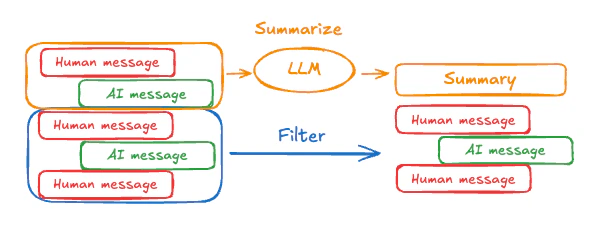
上述示例中,对消息进行裁剪或删除的问题在于,你可能会从消息队列的筛选中丢失信息。
正因为如此,一些应用程序从使用聊天模型对消息历史进行更复杂的总结方法中受益。为了在智能体中总结消息历史,请使用内置的SummarizationMiddleware:CODE_BLOCK_9See SummarizationMiddleware for more configuration options.
Access short term memory (state) in a tool using the ToolRuntime parameter.The tool_runtime parameter is hidden from the tool signature (so the model doesn’t see it), but the tool can access the state through it.CODE_BLOCK_10
To modify the agent’s short-term memory (state) during execution, you can return state updates directly from the tools.This is useful for persisting intermediate results or making information accessible to subsequent tools or prompts.CODE_BLOCK_11
Access short term memory (state) in middleware to create dynamic prompts based on conversation history or custom state fields.CODE_BLOCK_12CODE_BLOCK_13