

添加短期记忆
短期记忆(线程级别持久化)使智能体能够跟踪多轮对话。要添加短期记忆:from langgraph.checkpoint.memory import InMemorySaver
from langgraph.graph import StateGraph
checkpointer = InMemorySaver()
builder = StateGraph(...)
graph = builder.compile(checkpointer=checkpointer)
graph.invoke(
{"messages": [{"role": "user", "content": "hi! i am Bob"}]},
{"configurable": {"thread_id": "1"}},
)
在生产中使用
在生产环境中,使用由数据库支持的检查点器:from langgraph.checkpoint.postgres import PostgresSaver
DB_URI = "postgresql://postgres:postgres@localhost:5442/postgres?sslmode=disable"
with PostgresSaver.from_conn_string(DB_URI) as checkpointer:
builder = StateGraph(...)
graph = builder.compile(checkpointer=checkpointer)
Example: using Postgres checkpointer
Example: using Postgres checkpointer
pip install -U "psycopg[binary,pool]" langgraph langgraph-checkpoint-postgres
您在使用Postgres检查点器第一次时需要调用
checkpointer.setup()- Sync
- Async
from langchain.chat_models import init_chat_model
from langgraph.graph import StateGraph, MessagesState, START
from langgraph.checkpoint.postgres import PostgresSaver

model = init_chat_model(model="anthropic:claude-3-5-haiku-latest")

DB_URI = "postgresql://postgres:postgres@localhost:5442/postgres?sslmode=disable"
with PostgresSaver.from_conn_string(DB_URI) as checkpointer:
    # checkpointer.setup()

    def call_model(state: MessagesState):
        response = model.invoke(state["messages"])
        return {"messages": response}

    builder = StateGraph(MessagesState)
    builder.add_node(call_model)
    builder.add_edge(START, "call_model")

    graph = builder.compile(checkpointer=checkpointer)

    config = {
        "configurable": {
            "thread_id": "1"
        }
    }

    for chunk in graph.stream(
        {"messages": [{"role": "user", "content": "hi! I'm bob"}]},
        config,
        stream_mode="values"
    ):
        chunk["messages"][-1].pretty_print()

    for chunk in graph.stream(
        {"messages": [{"role": "user", "content": "what's my name?"}]},
        config,
        stream_mode="values"
    ):
        chunk["messages"][-1].pretty_print()
from langchain.chat_models import init_chat_model
from langgraph.graph import StateGraph, MessagesState, START
from langgraph.checkpoint.postgres.aio import AsyncPostgresSaver

model = init_chat_model(model="anthropic:claude-3-5-haiku-latest")

DB_URI = "postgresql://postgres:postgres@localhost:5442/postgres?sslmode=disable"
async with AsyncPostgresSaver.from_conn_string(DB_URI) as checkpointer:
    # await checkpointer.setup()

    async def call_model(state: MessagesState):
        response = await model.ainvoke(state["messages"])
        return {"messages": response}

    builder = StateGraph(MessagesState)
    builder.add_node(call_model)
    builder.add_edge(START, "call_model")

    graph = builder.compile(checkpointer=checkpointer)

    config = {
        "configurable": {
            "thread_id": "1"
        }
    }

    async for chunk in graph.astream(
        {"messages": [{"role": "user", "content": "hi! I'm bob"}]},
        config,
        stream_mode="values"
    ):
        chunk["messages"][-1].pretty_print()

    async for chunk in graph.astream(
        {"messages": [{"role": "user", "content": "what's my name?"}]},
        config,
        stream_mode="values"
    ):
        chunk["messages"][-1].pretty_print()
Example: using [MongoDB](https://pypi.org/project/langgraph-checkpoint-mongodb/) checkpointer
Example: using [MongoDB](https://pypi.org/project/langgraph-checkpoint-mongodb/) checkpointer
pip install -U pymongo langgraph langgraph-checkpoint-mongodb
设置
要使用 MongoDB 检查点器,您需要一个 MongoDB 集群。如果您还没有集群,请遵循此指南来创建一个集群。
- Sync
- Async
from langchain.chat_models import init_chat_model
from langgraph.graph import StateGraph, MessagesState, START
from langgraph.checkpoint.mongodb import MongoDBSaver

model = init_chat_model(model="anthropic:claude-3-5-haiku-latest")

DB_URI = "localhost:27017"
with MongoDBSaver.from_conn_string(DB_URI) as checkpointer:

    def call_model(state: MessagesState):
        response = model.invoke(state["messages"])
        return {"messages": response}

    builder = StateGraph(MessagesState)
    builder.add_node(call_model)
    builder.add_edge(START, "call_model")

    graph = builder.compile(checkpointer=checkpointer)

    config = {
        "configurable": {
            "thread_id": "1"
        }
    }

    for chunk in graph.stream(
        {"messages": [{"role": "user", "content": "hi! I'm bob"}]},
        config,
        stream_mode="values"
    ):
        chunk["messages"][-1].pretty_print()

    for chunk in graph.stream(
        {"messages": [{"role": "user", "content": "what's my name?"}]},
        config,
        stream_mode="values"
    ):
        chunk["messages"][-1].pretty_print()
from langchain.chat_models import init_chat_model
from langgraph.graph import StateGraph, MessagesState, START
from langgraph.checkpoint.mongodb.aio import AsyncMongoDBSaver

model = init_chat_model(model="anthropic:claude-3-5-haiku-latest")

DB_URI = "localhost:27017"
async with AsyncMongoDBSaver.from_conn_string(DB_URI) as checkpointer:

    async def call_model(state: MessagesState):
        response = await model.ainvoke(state["messages"])
        return {"messages": response}

    builder = StateGraph(MessagesState)
    builder.add_node(call_model)
    builder.add_edge(START, "call_model")

    graph = builder.compile(checkpointer=checkpointer)

    config = {
        "configurable": {
            "thread_id": "1"
        }
    }

    async for chunk in graph.astream(
        {"messages": [{"role": "user", "content": "hi! I'm bob"}]},
        config,
        stream_mode="values"
    ):
        chunk["messages"][-1].pretty_print()

    async for chunk in graph.astream(
        {"messages": [{"role": "user", "content": "what's my name?"}]},
        config,
        stream_mode="values"
    ):
        chunk["messages"][-1].pretty_print()
Example: using [Redis](https://pypi.org/project/langgraph-checkpoint-redis/) checkpointer
Example: using [Redis](https://pypi.org/project/langgraph-checkpoint-redis/) checkpointer
pip install -U langgraph langgraph-checkpoint-redis
您在使用 Redis 检查点器第一次时需要调用
checkpointer.setup()- Sync
- Async
from langchain.chat_models import init_chat_model
from langgraph.graph import StateGraph, MessagesState, START
from langgraph.checkpoint.redis import RedisSaver

model = init_chat_model(model="anthropic:claude-3-5-haiku-latest")

DB_URI = "redis://localhost:6379"
with RedisSaver.from_conn_string(DB_URI) as checkpointer:
    # checkpointer.setup()

    def call_model(state: MessagesState):
        response = model.invoke(state["messages"])
        return {"messages": response}

    builder = StateGraph(MessagesState)
    builder.add_node(call_model)
    builder.add_edge(START, "call_model")

    graph = builder.compile(checkpointer=checkpointer)

    config = {
        "configurable": {
            "thread_id": "1"
        }
    }

    for chunk in graph.stream(
        {"messages": [{"role": "user", "content": "hi! I'm bob"}]},
        config,
        stream_mode="values"
    ):
        chunk["messages"][-1].pretty_print()

    for chunk in graph.stream(
        {"messages": [{"role": "user", "content": "what's my name?"}]},
        config,
        stream_mode="values"
    ):
        chunk["messages"][-1].pretty_print()
from langchain.chat_models import init_chat_model
from langgraph.graph import StateGraph, MessagesState, START
from langgraph.checkpoint.redis.aio import AsyncRedisSaver

model = init_chat_model(model="anthropic:claude-3-5-haiku-latest")

DB_URI = "redis://localhost:6379"
async with AsyncRedisSaver.from_conn_string(DB_URI) as checkpointer:
    # await checkpointer.asetup()

    async def call_model(state: MessagesState):
        response = await model.ainvoke(state["messages"])
        return {"messages": response}

    builder = StateGraph(MessagesState)
    builder.add_node(call_model)
    builder.add_edge(START, "call_model")

    graph = builder.compile(checkpointer=checkpointer)

    config = {
        "configurable": {
            "thread_id": "1"
        }
    }

    async for chunk in graph.astream(
        {"messages": [{"role": "user", "content": "hi! I'm bob"}]},
        config,
        stream_mode="values"
    ):
        chunk["messages"][-1].pretty_print()

    async for chunk in graph.astream(
        {"messages": [{"role": "user", "content": "what's my name?"}]},
        config,
        stream_mode="values"
    ):
        chunk["messages"][-1].pretty_print()
在子图中使用
如果您的图包含子图,您只需要在编译父图时提供检查点器。LangGraph会自动将检查点器传播到子子图中。from langgraph.graph import START, StateGraph
from langgraph.checkpoint.memory import InMemorySaver
from typing import TypedDict
class State(TypedDict):
foo: str
# Subgraph
def subgraph_node_1(state: State):
return {"foo": state["foo"] + "bar"}
subgraph_builder = StateGraph(State)
subgraph_builder.add_node(subgraph_node_1)
subgraph_builder.add_edge(START, "subgraph_node_1")
subgraph = subgraph_builder.compile()
# Parent graph
builder = StateGraph(State)
builder.add_node("node_1", subgraph)
builder.add_edge(START, "node_1")
checkpointer = InMemorySaver()
graph = builder.compile(checkpointer=checkpointer)
subgraph_builder = StateGraph(...)
subgraph = subgraph_builder.compile(checkpointer=True)
添加长期记忆
使用长期记忆来存储跨对话的用户特定或应用特定数据。from langgraph.store.memory import InMemoryStore
from langgraph.graph import StateGraph
store = InMemoryStore()
builder = StateGraph(...)
graph = builder.compile(store=store)
在生产环境中使用
在生产环境中,使用由数据库支持的存储。from langgraph.store.postgres import PostgresStore
DB_URI = "postgresql://postgres:postgres@localhost:5442/postgres?sslmode=disable"
with PostgresStore.from_conn_string(DB_URI) as store:
builder = StateGraph(...)
graph = builder.compile(store=store)
Example: using Postgres store
Example: using Postgres store
pip install -U "psycopg[binary,pool]" langgraph langgraph-checkpoint-postgres
您在首次使用Postgres存储时需要调用
store.setup()- Sync
- Async
from langchain_core.runnables import RunnableConfig
from langchain.chat_models import init_chat_model
from langgraph.graph import StateGraph, MessagesState, START
from langgraph.checkpoint.postgres import PostgresSaver
from langgraph.store.postgres import PostgresStore
from langgraph.store.base import BaseStore

model = init_chat_model(model="anthropic:claude-3-5-haiku-latest")

DB_URI = "postgresql://postgres:postgres@localhost:5442/postgres?sslmode=disable"

with (
    PostgresStore.from_conn_string(DB_URI) as store,
    PostgresSaver.from_conn_string(DB_URI) as checkpointer,
):
    # store.setup()
    # checkpointer.setup()

    def call_model(
        state: MessagesState,
        config: RunnableConfig,
        *,
        store: BaseStore,
    ):
        user_id = config["configurable"]["user_id"]
        namespace = ("memories", user_id)
        memories = store.search(namespace, query=str(state["messages"][-1].content))
        info = "\n".join([d.value["data"] for d in memories])
        system_msg = f"You are a helpful assistant talking to the user. User info: {info}"

        # Store new memories if the user asks the model to remember
        last_message = state["messages"][-1]
        if "remember" in last_message.content.lower():
            memory = "User name is Bob"
            store.put(namespace, str(uuid.uuid4()), {"data": memory})

        response = model.invoke(
            [{"role": "system", "content": system_msg}] + state["messages"]
        )
        return {"messages": response}

    builder = StateGraph(MessagesState)
    builder.add_node(call_model)
    builder.add_edge(START, "call_model")

    graph = builder.compile(
        checkpointer=checkpointer,
        store=store,
    )

    config = {
        "configurable": {
            "thread_id": "1",
            "user_id": "1",
        }
    }
    for chunk in graph.stream(
        {"messages": [{"role": "user", "content": "Hi! Remember: my name is Bob"}]},
        config,
        stream_mode="values",
    ):
        chunk["messages"][-1].pretty_print()

    config = {
        "configurable": {
            "thread_id": "2",
            "user_id": "1",
        }
    }

    for chunk in graph.stream(
        {"messages": [{"role": "user", "content": "what is my name?"}]},
        config,
        stream_mode="values",
    ):
        chunk["messages"][-1].pretty_print()
from langchain_core.runnables import RunnableConfig
from langchain.chat_models import init_chat_model
from langgraph.graph import StateGraph, MessagesState, START
from langgraph.checkpoint.postgres.aio import AsyncPostgresSaver
from langgraph.store.postgres.aio import AsyncPostgresStore
from langgraph.store.base import BaseStore

model = init_chat_model(model="anthropic:claude-3-5-haiku-latest")

DB_URI = "postgresql://postgres:postgres@localhost:5442/postgres?sslmode=disable"

async with (
    AsyncPostgresStore.from_conn_string(DB_URI) as store,
    AsyncPostgresSaver.from_conn_string(DB_URI) as checkpointer,
):
    # await store.setup()
    # await checkpointer.setup()

    async def call_model(
        state: MessagesState,
        config: RunnableConfig,
        *,
        store: BaseStore,
    ):
        user_id = config["configurable"]["user_id"]
        namespace = ("memories", user_id)
        memories = await store.asearch(namespace, query=str(state["messages"][-1].content))
        info = "\n".join([d.value["data"] for d in memories])
        system_msg = f"You are a helpful assistant talking to the user. User info: {info}"

        # Store new memories if the user asks the model to remember
        last_message = state["messages"][-1]
        if "remember" in last_message.content.lower():
            memory = "User name is Bob"
            await store.aput(namespace, str(uuid.uuid4()), {"data": memory})

        response = await model.ainvoke(
            [{"role": "system", "content": system_msg}] + state["messages"]
        )
        return {"messages": response}

    builder = StateGraph(MessagesState)
    builder.add_node(call_model)
    builder.add_edge(START, "call_model")

    graph = builder.compile(
        checkpointer=checkpointer,
        store=store,
    )

    config = {
        "configurable": {
            "thread_id": "1",
            "user_id": "1",
        }
    }
    async for chunk in graph.astream(
        {"messages": [{"role": "user", "content": "Hi! Remember: my name is Bob"}]},
        config,
        stream_mode="values",
    ):
        chunk["messages"][-1].pretty_print()

    config = {
        "configurable": {
            "thread_id": "2",
            "user_id": "1",
        }
    }

    async for chunk in graph.astream(
        {"messages": [{"role": "user", "content": "what is my name?"}]},
        config,
        stream_mode="values",
    ):
        chunk["messages"][-1].pretty_print()
Example: using [Redis](https://pypi.org/project/langgraph-checkpoint-redis/) store
Example: using [Redis](https://pypi.org/project/langgraph-checkpoint-redis/) store
pip install -U langgraph langgraph-checkpoint-redis
您在首次使用Redis存储时需要调用
store.setup()- Sync
- Async
from langchain_core.runnables import RunnableConfig
from langchain.chat_models import init_chat_model
from langgraph.graph import StateGraph, MessagesState, START
from langgraph.checkpoint.redis import RedisSaver
from langgraph.store.redis import RedisStore
from langgraph.store.base import BaseStore

model = init_chat_model(model="anthropic:claude-3-5-haiku-latest")

DB_URI = "redis://localhost:6379"

with (
    RedisStore.from_conn_string(DB_URI) as store,
    RedisSaver.from_conn_string(DB_URI) as checkpointer,
):
    store.setup()
    checkpointer.setup()

    def call_model(
        state: MessagesState,
        config: RunnableConfig,
        *,
        store: BaseStore,
    ):
        user_id = config["configurable"]["user_id"]
        namespace = ("memories", user_id)
        memories = store.search(namespace, query=str(state["messages"][-1].content))
        info = "\n".join([d.value["data"] for d in memories])
        system_msg = f"You are a helpful assistant talking to the user. User info: {info}"

        # Store new memories if the user asks the model to remember
        last_message = state["messages"][-1]
        if "remember" in last_message.content.lower():
            memory = "User name is Bob"
            store.put(namespace, str(uuid.uuid4()), {"data": memory})

        response = model.invoke(
            [{"role": "system", "content": system_msg}] + state["messages"]
        )
        return {"messages": response}

    builder = StateGraph(MessagesState)
    builder.add_node(call_model)
    builder.add_edge(START, "call_model")

    graph = builder.compile(
        checkpointer=checkpointer,
        store=store,
    )

    config = {
        "configurable": {
            "thread_id": "1",
            "user_id": "1",
        }
    }
    for chunk in graph.stream(
        {"messages": [{"role": "user", "content": "Hi! Remember: my name is Bob"}]},
        config,
        stream_mode="values",
    ):
        chunk["messages"][-1].pretty_print()

    config = {
        "configurable": {
            "thread_id": "2",
            "user_id": "1",
        }
    }

    for chunk in graph.stream(
        {"messages": [{"role": "user", "content": "what is my name?"}]},
        config,
        stream_mode="values",
    ):
        chunk["messages"][-1].pretty_print()
from langchain_core.runnables import RunnableConfig
from langchain.chat_models import init_chat_model
from langgraph.graph import StateGraph, MessagesState, START
from langgraph.checkpoint.redis.aio import AsyncRedisSaver
from langgraph.store.redis.aio import AsyncRedisStore
from langgraph.store.base import BaseStore

model = init_chat_model(model="anthropic:claude-3-5-haiku-latest")

DB_URI = "redis://localhost:6379"

async with (
    AsyncRedisStore.from_conn_string(DB_URI) as store,
    AsyncRedisSaver.from_conn_string(DB_URI) as checkpointer,
):
    # await store.setup()
    # await checkpointer.asetup()

    async def call_model(
        state: MessagesState,
        config: RunnableConfig,
        *,
        store: BaseStore,
    ):
        user_id = config["configurable"]["user_id"]
        namespace = ("memories", user_id)
        memories = await store.asearch(namespace, query=str(state["messages"][-1].content))
        info = "\n".join([d.value["data"] for d in memories])
        system_msg = f"You are a helpful assistant talking to the user. User info: {info}"

        # Store new memories if the user asks the model to remember
        last_message = state["messages"][-1]
        if "remember" in last_message.content.lower():
            memory = "User name is Bob"
            await store.aput(namespace, str(uuid.uuid4()), {"data": memory})

        response = await model.ainvoke(
            [{"role": "system", "content": system_msg}] + state["messages"]
        )
        return {"messages": response}

    builder = StateGraph(MessagesState)
    builder.add_node(call_model)
    builder.add_edge(START, "call_model")

    graph = builder.compile(
        checkpointer=checkpointer,
        store=store,
    )

    config = {
        "configurable": {
            "thread_id": "1",
            "user_id": "1",
        }
    }
    async for chunk in graph.astream(
        {"messages": [{"role": "user", "content": "Hi! Remember: my name is Bob"}]},
        config,
        stream_mode="values",
    ):
        chunk["messages"][-1].pretty_print()

    config = {
        "configurable": {
            "thread_id": "2",
            "user_id": "1",
        }
    }

    async for chunk in graph.astream(
        {"messages": [{"role": "user", "content": "what is my name?"}]},
        config,
        stream_mode="values",
    ):
        chunk["messages"][-1].pretty_print()
使用语义搜索
启用您图内存存储中的语义搜索功能,以便图智能体可以通过语义相似度在存储中搜索项目。from langchain.embeddings import init_embeddings
from langgraph.store.memory import InMemoryStore
# Create store with semantic search enabled
embeddings = init_embeddings("openai:text-embedding-3-small")
store = InMemoryStore(
index={
"embed": embeddings,
"dims": 1536,
}
)
store.put(("user_123", "memories"), "1", {"text": "I love pizza"})
store.put(("user_123", "memories"), "2", {"text": "I am a plumber"})
items = store.search(
("user_123", "memories"), query="I'm hungry", limit=1
)
Long-term memory with semantic search
Long-term memory with semantic search
from langchain.embeddings import init_embeddings
from langchain.chat_models import init_chat_model
from langgraph.store.base import BaseStore
from langgraph.store.memory import InMemoryStore
from langgraph.graph import START, MessagesState, StateGraph

model = init_chat_model("openai:gpt-4o-mini")

# Create store with semantic search enabled
embeddings = init_embeddings("openai:text-embedding-3-small")
store = InMemoryStore(
    index={
        "embed": embeddings,
        "dims": 1536,
    }
)

store.put(("user_123", "memories"), "1", {"text": "I love pizza"})
store.put(("user_123", "memories"), "2", {"text": "I am a plumber"})

def chat(state, *, store: BaseStore):
    # Search based on user's last message
    items = store.search(
        ("user_123", "memories"), query=state["messages"][-1].content, limit=2
    )
    memories = "\n".join(item.value["text"] for item in items)
    memories = f"## Memories of user\n{memories}" if memories else ""
    response = model.invoke(
        [
            {"role": "system", "content": f"You are a helpful assistant.\n{memories}"},
            *state["messages"],
        ]
    )
    return {"messages": [response]}


builder = StateGraph(MessagesState)
builder.add_node(chat)
builder.add_edge(START, "chat")
graph = builder.compile(store=store)

for message, metadata in graph.stream(
    input={"messages": [{"role": "user", "content": "I'm hungry"}]},
    stream_mode="messages",
):
    print(message.content, end="")
管理短期记忆
启用短期记忆后,长对话可能会超出LLM的上下文窗口。常见解决方案包括:- 裁剪消息: 在调用LLM之前移除前N条或最后N条消息
- 删除消息 从LangGraph状态中永久删除
- 总结消息: 总结历史中的早期消息并用总结替换它们
- 管理检查点 以存储和检索消息历史
- 自定义策略(例如,消息过滤等)
去除消息
大多数LLM都有一个最大支持的上下文窗口(以令牌计)。决定何时截断消息的一种方法是通过计算消息历史中的令牌数量,并在接近该限制时进行截断。如果您使用LangChain,可以使用trim messages实用程序,并指定从列表中保留的令牌数量,以及用于处理边界的strategy(例如,保留最后的 max_tokens)。
为了裁剪消息历史,请使用trim_messages函数:
from langchain_core.messages.utils import (
    trim_messages,
    count_tokens_approximately
)

def call_model(state: MessagesState):
    messages = trim_messages(
        state["messages"],
        strategy="last",
        token_counter=count_tokens_approximately,
        max_tokens=128,
        start_on="human",
        end_on=("human", "tool"),
    )
    response = model.invoke(messages)
    return {"messages": [response]}

builder = StateGraph(MessagesState)
builder.add_node(call_model)
...
Full example: trim messages
Full example: trim messages
from langchain_core.messages.utils import (
    trim_messages,
    count_tokens_approximately
)
from langchain.chat_models import init_chat_model
from langgraph.graph import StateGraph, START, MessagesState

model = init_chat_model("anthropic:claude-sonnet-4-5")
summarization_model = model.bind(max_tokens=128)

def call_model(state: MessagesState):
    messages = trim_messages(
        state["messages"],
        strategy="last",
        token_counter=count_tokens_approximately,
        max_tokens=128,
        start_on="human",
        end_on=("human", "tool"),
    )
    response = model.invoke(messages)
    return {"messages": [response]}

checkpointer = InMemorySaver()
builder = StateGraph(MessagesState)
builder.add_node(call_model)
builder.add_edge(START, "call_model")
graph = builder.compile(checkpointer=checkpointer)

config = {"configurable": {"thread_id": "1"}}
graph.invoke({"messages": "hi, my name is bob"}, config)
graph.invoke({"messages": "write a short poem about cats"}, config)
graph.invoke({"messages": "now do the same but for dogs"}, config)
final_response = graph.invoke({"messages": "what's my name?"}, config)

final_response["messages"][-1].pretty_print()
================================== Ai Message ==================================

Your name is Bob, as you mentioned when you first introduced yourself.
删除消息
您可以删除图状态中的消息以管理消息历史。这在您想要删除特定消息或清除整个消息历史时非常有用。 要删除图状态中的消息,您可以使用RemoveMessage。为了使 RemoveMessage 正常工作,您需要使用带有 add_messages reducer 的状态键,例如 MessagesState。
要删除特定消息:
from langchain.messages import RemoveMessage

def delete_messages(state):
    messages = state["messages"]
    if len(messages) > 2:
        # remove the earliest two messages
        return {"messages": [RemoveMessage(id=m.id) for m in messages[:2]]}
from langgraph.graph.message import REMOVE_ALL_MESSAGES

def delete_messages(state):
    return {"messages": [RemoveMessage(id=REMOVE_ALL_MESSAGES)]}
在删除消息时,请确保生成的消息历史记录是有效的。检查您所使用的LLM提供商的限制。例如:
- 一些提供商期望消息历史从一条
user消息开始 - 大多数提供商要求工具调用后的
assistant消息后面必须跟随相应的tool结果消息。
Full example: delete messages
Full example: delete messages
from langchain.messages import RemoveMessage

def delete_messages(state):
    messages = state["messages"]
    if len(messages) > 2:
        # remove the earliest two messages
        return {"messages": [RemoveMessage(id=m.id) for m in messages[:2]]}

def call_model(state: MessagesState):
    response = model.invoke(state["messages"])
    return {"messages": response}

builder = StateGraph(MessagesState)
builder.add_sequence([call_model, delete_messages])
builder.add_edge(START, "call_model")

checkpointer = InMemorySaver()
app = builder.compile(checkpointer=checkpointer)

for event in app.stream(
    {"messages": [{"role": "user", "content": "hi! I'm bob"}]},
    config,
    stream_mode="values"
):
    print([(message.type, message.content) for message in event["messages"]])

for event in app.stream(
    {"messages": [{"role": "user", "content": "what's my name?"}]},
    config,
    stream_mode="values"
):
    print([(message.type, message.content) for message in event["messages"]])
[('human', "hi! I'm bob")]
[('human', "hi! I'm bob"), ('ai', 'Hi Bob! How are you doing today? Is there anything I can help you with?')]
[('human', "hi! I'm bob"), ('ai', 'Hi Bob! How are you doing today? Is there anything I can help you with?'), ('human', "what's my name?")]
[('human', "hi! I'm bob"), ('ai', 'Hi Bob! How are you doing today? Is there anything I can help you with?'), ('human', "what's my name?"), ('ai', 'Your name is Bob.')]
[('human', "what's my name?"), ('ai', 'Your name is Bob.')]
消息摘要
上述示例中,对消息进行裁剪或删除的问题在于,你可能会从消息队列的筛选中丢失信息。正因为如此,一些应用程序从使用聊天模型对消息历史进行更复杂的总结方法中获益。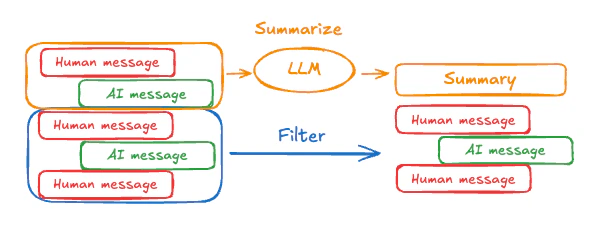
MessagesState以包含一个summary键:
from langgraph.graph import MessagesState
class State(MessagesState):
    summary: str
summarize_conversation 节点可以在积累了一定数量的消息后,在 messages 状态键中调用。
def summarize_conversation(state: State):

    # First, we get any existing summary
    summary = state.get("summary", "")

    # Create our summarization prompt
    if summary:

        # A summary already exists
        summary_message = (
            f"This is a summary of the conversation to date: {summary}\n\n"
            "Extend the summary by taking into account the new messages above:"
        )

    else:
        summary_message = "Create a summary of the conversation above:"

    # Add prompt to our history
    messages = state["messages"] + [HumanMessage(content=summary_message)]
    response = model.invoke(messages)

    # Delete all but the 2 most recent messages
    delete_messages = [RemoveMessage(id=m.id) for m in state["messages"][:-2]]
    return {"summary": response.content, "messages": delete_messages}
Full example: summarize messages
Full example: summarize messages
from typing import Any, TypedDict

from langchain.chat_models import init_chat_model
from langchain.messages import AnyMessage
from langchain_core.messages.utils import count_tokens_approximately
from langgraph.graph import StateGraph, START, MessagesState
from langgraph.checkpoint.memory import InMemorySaver
from langmem.short_term import SummarizationNode, RunningSummary

model = init_chat_model("anthropic:claude-sonnet-4-5")
summarization_model = model.bind(max_tokens=128)

class State(MessagesState):
    context: dict[str, RunningSummary]

class LLMInputState(TypedDict):
    summarized_messages: list[AnyMessage]
    context: dict[str, RunningSummary]

summarization_node = SummarizationNode(
    token_counter=count_tokens_approximately,
    model=summarization_model,
    max_tokens=256,
    max_tokens_before_summary=256,
    max_summary_tokens=128,
)

def call_model(state: LLMInputState):
    response = model.invoke(state["summarized_messages"])
    return {"messages": [response]}

checkpointer = InMemorySaver()
builder = StateGraph(State)
builder.add_node(call_model)
builder.add_node("summarize", summarization_node)
builder.add_edge(START, "summarize")
builder.add_edge("summarize", "call_model")
graph = builder.compile(checkpointer=checkpointer)

# Invoke the graph
config = {"configurable": {"thread_id": "1"}}
graph.invoke({"messages": "hi, my name is bob"}, config)
graph.invoke({"messages": "write a short poem about cats"}, config)
graph.invoke({"messages": "now do the same but for dogs"}, config)
final_response = graph.invoke({"messages": "what's my name?"}, config)

final_response["messages"][-1].pretty_print()
print("\nSummary:", final_response["context"]["running_summary"].summary)
- 我们将在
context字段中跟踪我们的运行摘要
SummarizationNode 提供)。- 定义仅用于过滤的私有状态
call_model 节点。- 我们在这里传递一个私有输入状态,以隔离由摘要节点返回的消息
================================== Ai Message ==================================

From our conversation, I can see that you introduced yourself as Bob. That's the name you shared with me when we began talking.

Summary: In this conversation, I was introduced to Bob, who then asked me to write a poem about cats. I composed a poem titled "The Mystery of Cats" that captured cats' graceful movements, independent nature, and their special relationship with humans. Bob then requested a similar poem about dogs, so I wrote "The Joy of Dogs," which highlighted dogs' loyalty, enthusiasm, and loving companionship. Both poems were written in a similar style but emphasized the distinct characteristics that make each pet special.
管理检查点
您可以查看和删除检查点存储的信息。查看线程状态
- Graph/Functional API
- Checkpointer API
config = {
    "configurable": {
        "thread_id": "1",
        # optionally provide an ID for a specific checkpoint,
        # otherwise the latest checkpoint is shown
        # "checkpoint_id": "1f029ca3-1f5b-6704-8004-820c16b69a5a"  #

    }
}
graph.get_state(config)
StateSnapshot(
    values={'messages': [HumanMessage(content="hi! I'm bob"), AIMessage(content='Hi Bob! How are you doing today?), HumanMessage(content="what's my name?"), AIMessage(content='Your name is Bob.')]}, next=(),
    config={'configurable': {'thread_id': '1', 'checkpoint_ns': '', 'checkpoint_id': '1f029ca3-1f5b-6704-8004-820c16b69a5a'}},
    metadata={
        'source': 'loop',
        'writes': {'call_model': {'messages': AIMessage(content='Your name is Bob.')}},
        'step': 4,
        'parents': {},
        'thread_id': '1'
    },
    created_at='2025-05-05T16:01:24.680462+00:00',
    parent_config={'configurable': {'thread_id': '1', 'checkpoint_ns': '', 'checkpoint_id': '1f029ca3-1790-6b0a-8003-baf965b6a38f'}},
    tasks=(),
    interrupts=()
)
config = {
    "configurable": {
        "thread_id": "1",
        # optionally provide an ID for a specific checkpoint,
        # otherwise the latest checkpoint is shown
        # "checkpoint_id": "1f029ca3-1f5b-6704-8004-820c16b69a5a"  #

    }
}
checkpointer.get_tuple(config)
CheckpointTuple(
    config={'configurable': {'thread_id': '1', 'checkpoint_ns': '', 'checkpoint_id': '1f029ca3-1f5b-6704-8004-820c16b69a5a'}},
    checkpoint={
        'v': 3,
        'ts': '2025-05-05T16:01:24.680462+00:00',
        'id': '1f029ca3-1f5b-6704-8004-820c16b69a5a',
        'channel_versions': {'__start__': '00000000000000000000000000000005.0.5290678567601859', 'messages': '00000000000000000000000000000006.0.3205149138784782', 'branch:to:call_model': '00000000000000000000000000000006.0.14611156755133758'}, 'versions_seen': {'__input__': {}, '__start__': {'__start__': '00000000000000000000000000000004.0.5736472536395331'}, 'call_model': {'branch:to:call_model': '00000000000000000000000000000005.0.1410174088651449'}},
        'channel_values': {'messages': [HumanMessage(content="hi! I'm bob"), AIMessage(content='Hi Bob! How are you doing today?), HumanMessage(content="what's my name?"), AIMessage(content='Your name is Bob.')]},
    },
    metadata={
        'source': 'loop',
        'writes': {'call_model': {'messages': AIMessage(content='Your name is Bob.')}},
        'step': 4,
        'parents': {},
        'thread_id': '1'
    },
    parent_config={'configurable': {'thread_id': '1', 'checkpoint_ns': '', 'checkpoint_id': '1f029ca3-1790-6b0a-8003-baf965b6a38f'}},
    pending_writes=[]
)
查看线程历史
- Graph/Functional API
- Checkpointer API
config = {
    "configurable": {
        "thread_id": "1"
    }
}
list(graph.get_state_history(config))
[
    StateSnapshot(
        values={'messages': [HumanMessage(content="hi! I'm bob"), AIMessage(content='Hi Bob! How are you doing today? Is there anything I can help you with?'), HumanMessage(content="what's my name?"), AIMessage(content='Your name is Bob.')]},
        next=(),
        config={'configurable': {'thread_id': '1', 'checkpoint_ns': '', 'checkpoint_id': '1f029ca3-1f5b-6704-8004-820c16b69a5a'}},
        metadata={'source': 'loop', 'writes': {'call_model': {'messages': AIMessage(content='Your name is Bob.')}}, 'step': 4, 'parents': {}, 'thread_id': '1'},
        created_at='2025-05-05T16:01:24.680462+00:00',
        parent_config={'configurable': {'thread_id': '1', 'checkpoint_ns': '', 'checkpoint_id': '1f029ca3-1790-6b0a-8003-baf965b6a38f'}},
        tasks=(),
        interrupts=()
    ),
    StateSnapshot(
        values={'messages': [HumanMessage(content="hi! I'm bob"), AIMessage(content='Hi Bob! How are you doing today? Is there anything I can help you with?'), HumanMessage(content="what's my name?")]},
        next=('call_model',),
        config={'configurable': {'thread_id': '1', 'checkpoint_ns': '', 'checkpoint_id': '1f029ca3-1790-6b0a-8003-baf965b6a38f'}},
        metadata={'source': 'loop', 'writes': None, 'step': 3, 'parents': {}, 'thread_id': '1'},
        created_at='2025-05-05T16:01:23.863421+00:00',
        parent_config={...}
        tasks=(PregelTask(id='8ab4155e-6b15-b885-9ce5-bed69a2c305c', name='call_model', path=('__pregel_pull', 'call_model'), error=None, interrupts=(), state=None, result={'messages': AIMessage(content='Your name is Bob.')}),),
        interrupts=()
    ),
    StateSnapshot(
        values={'messages': [HumanMessage(content="hi! I'm bob"), AIMessage(content='Hi Bob! How are you doing today? Is there anything I can help you with?')]},
        next=('__start__',),
        config={...},
        metadata={'source': 'input', 'writes': {'__start__': {'messages': [{'role': 'user', 'content': "what's my name?"}]}}, 'step': 2, 'parents': {}, 'thread_id': '1'},
        created_at='2025-05-05T16:01:23.863173+00:00',
        parent_config={...}
        tasks=(PregelTask(id='24ba39d6-6db1-4c9b-f4c5-682aeaf38dcd', name='__start__', path=('__pregel_pull', '__start__'), error=None, interrupts=(), state=None, result={'messages': [{'role': 'user', 'content': "what's my name?"}]}),),
        interrupts=()
    ),
    StateSnapshot(
        values={'messages': [HumanMessage(content="hi! I'm bob"), AIMessage(content='Hi Bob! How are you doing today? Is there anything I can help you with?')]},
        next=(),
        config={...},
        metadata={'source': 'loop', 'writes': {'call_model': {'messages': AIMessage(content='Hi Bob! How are you doing today? Is there anything I can help you with?')}}, 'step': 1, 'parents': {}, 'thread_id': '1'},
        created_at='2025-05-05T16:01:23.862295+00:00',
        parent_config={...}
        tasks=(),
        interrupts=()
    ),
    StateSnapshot(
        values={'messages': [HumanMessage(content="hi! I'm bob")]},
        next=('call_model',),
        config={...},
        metadata={'source': 'loop', 'writes': None, 'step': 0, 'parents': {}, 'thread_id': '1'},
        created_at='2025-05-05T16:01:22.278960+00:00',
        parent_config={...}
        tasks=(PregelTask(id='8cbd75e0-3720-b056-04f7-71ac805140a0', name='call_model', path=('__pregel_pull', 'call_model'), error=None, interrupts=(), state=None, result={'messages': AIMessage(content='Hi Bob! How are you doing today? Is there anything I can help you with?')}),),
        interrupts=()
    ),
    StateSnapshot(
        values={'messages': []},
        next=('__start__',),
        config={'configurable': {'thread_id': '1', 'checkpoint_ns': '', 'checkpoint_id': '1f029ca3-0870-6ce2-bfff-1f3f14c3e565'}},
        metadata={'source': 'input', 'writes': {'__start__': {'messages': [{'role': 'user', 'content': "hi! I'm bob"}]}}, 'step': -1, 'parents': {}, 'thread_id': '1'},
        created_at='2025-05-05T16:01:22.277497+00:00',
        parent_config=None,
        tasks=(PregelTask(id='d458367b-8265-812c-18e2-33001d199ce6', name='__start__', path=('__pregel_pull', '__start__'), error=None, interrupts=(), state=None, result={'messages': [{'role': 'user', 'content': "hi! I'm bob"}]}),),
        interrupts=()
    )
]
config = {
    "configurable": {
        "thread_id": "1"
    }
}
list(checkpointer.list(config))
[
    CheckpointTuple(
        config={'configurable': {'thread_id': '1', 'checkpoint_ns': '', 'checkpoint_id': '1f029ca3-1f5b-6704-8004-820c16b69a5a'}},
        checkpoint={
            'v': 3,
            'ts': '2025-05-05T16:01:24.680462+00:00',
            'id': '1f029ca3-1f5b-6704-8004-820c16b69a5a',
            'channel_versions': {'__start__': '00000000000000000000000000000005.0.5290678567601859', 'messages': '00000000000000000000000000000006.0.3205149138784782', 'branch:to:call_model': '00000000000000000000000000000006.0.14611156755133758'},
            'versions_seen': {'__input__': {}, '__start__': {'__start__': '00000000000000000000000000000004.0.5736472536395331'}, 'call_model': {'branch:to:call_model': '00000000000000000000000000000005.0.1410174088651449'}},
            'channel_values': {'messages': [HumanMessage(content="hi! I'm bob"), AIMessage(content='Hi Bob! How are you doing today? Is there anything I can help you with?'), HumanMessage(content="what's my name?"), AIMessage(content='Your name is Bob.')]},
        },
        metadata={'source': 'loop', 'writes': {'call_model': {'messages': AIMessage(content='Your name is Bob.')}}, 'step': 4, 'parents': {}, 'thread_id': '1'},
        parent_config={'configurable': {'thread_id': '1', 'checkpoint_ns': '', 'checkpoint_id': '1f029ca3-1790-6b0a-8003-baf965b6a38f'}},
        pending_writes=[]
    ),
    CheckpointTuple(
        config={'configurable': {'thread_id': '1', 'checkpoint_ns': '', 'checkpoint_id': '1f029ca3-1790-6b0a-8003-baf965b6a38f'}},
        checkpoint={
            'v': 3,
            'ts': '2025-05-05T16:01:23.863421+00:00',
            'id': '1f029ca3-1790-6b0a-8003-baf965b6a38f',
            'channel_versions': {'__start__': '00000000000000000000000000000005.0.5290678567601859', 'messages': '00000000000000000000000000000006.0.3205149138784782', 'branch:to:call_model': '00000000000000000000000000000006.0.14611156755133758'},
            'versions_seen': {'__input__': {}, '__start__': {'__start__': '00000000000000000000000000000004.0.5736472536395331'}, 'call_model': {'branch:to:call_model': '00000000000000000000000000000005.0.1410174088651449'}},
            'channel_values': {'messages': [HumanMessage(content="hi! I'm bob"), AIMessage(content='Hi Bob! How are you doing today? Is there anything I can help you with?'), HumanMessage(content="what's my name?")], 'branch:to:call_model': None}
        },
        metadata={'source': 'loop', 'writes': None, 'step': 3, 'parents': {}, 'thread_id': '1'},
        parent_config={...},
        pending_writes=[('8ab4155e-6b15-b885-9ce5-bed69a2c305c', 'messages', AIMessage(content='Your name is Bob.'))]
    ),
    CheckpointTuple(
        config={...},
        checkpoint={
            'v': 3,
            'ts': '2025-05-05T16:01:23.863173+00:00',
            'id': '1f029ca3-1790-616e-8002-9e021694a0cd',
            'channel_versions': {'__start__': '00000000000000000000000000000004.0.5736472536395331', 'messages': '00000000000000000000000000000003.0.7056767754077798', 'branch:to:call_model': '00000000000000000000000000000003.0.22059023329132854'},
            'versions_seen': {'__input__': {}, '__start__': {'__start__': '00000000000000000000000000000001.0.7040775356287469'}, 'call_model': {'branch:to:call_model': '00000000000000000000000000000002.0.9300422176788571'}},
            'channel_values': {'__start__': {'messages': [{'role': 'user', 'content': "what's my name?"}]}, 'messages': [HumanMessage(content="hi! I'm bob"), AIMessage(content='Hi Bob! How are you doing today? Is there anything I can help you with?')]}
        },
        metadata={'source': 'input', 'writes': {'__start__': {'messages': [{'role': 'user', 'content': "what's my name?"}]}}, 'step': 2, 'parents': {}, 'thread_id': '1'},
        parent_config={...},
        pending_writes=[('24ba39d6-6db1-4c9b-f4c5-682aeaf38dcd', 'messages', [{'role': 'user', 'content': "what's my name?"}]), ('24ba39d6-6db1-4c9b-f4c5-682aeaf38dcd', 'branch:to:call_model', None)]
    ),
    CheckpointTuple(
        config={...},
        checkpoint={
            'v': 3,
            'ts': '2025-05-05T16:01:23.862295+00:00',
            'id': '1f029ca3-178d-6f54-8001-d7b180db0c89',
            'channel_versions': {'__start__': '00000000000000000000000000000002.0.18673090920108737', 'messages': '00000000000000000000000000000003.0.7056767754077798', 'branch:to:call_model': '00000000000000000000000000000003.0.22059023329132854'},
            'versions_seen': {'__input__': {}, '__start__': {'__start__': '00000000000000000000000000000001.0.7040775356287469'}, 'call_model': {'branch:to:call_model': '00000000000000000000000000000002.0.9300422176788571'}},
            'channel_values': {'messages': [HumanMessage(content="hi! I'm bob"), AIMessage(content='Hi Bob! How are you doing today? Is there anything I can help you with?')]}
        },
        metadata={'source': 'loop', 'writes': {'call_model': {'messages': AIMessage(content='Hi Bob! How are you doing today? Is there anything I can help you with?')}}, 'step': 1, 'parents': {}, 'thread_id': '1'},
        parent_config={...},
        pending_writes=[]
    ),
    CheckpointTuple(
        config={...},
        checkpoint={
            'v': 3,
            'ts': '2025-05-05T16:01:22.278960+00:00',
            'id': '1f029ca3-0874-6612-8000-339f2abc83b1',
            'channel_versions': {'__start__': '00000000000000000000000000000002.0.18673090920108737', 'messages': '00000000000000000000000000000002.0.30296526818059655', 'branch:to:call_model': '00000000000000000000000000000002.0.9300422176788571'},
            'versions_seen': {'__input__': {}, '__start__': {'__start__': '00000000000000000000000000000001.0.7040775356287469'}},
            'channel_values': {'messages': [HumanMessage(content="hi! I'm bob")], 'branch:to:call_model': None}
        },
        metadata={'source': 'loop', 'writes': None, 'step': 0, 'parents': {}, 'thread_id': '1'},
        parent_config={...},
        pending_writes=[('8cbd75e0-3720-b056-04f7-71ac805140a0', 'messages', AIMessage(content='Hi Bob! How are you doing today? Is there anything I can help you with?'))]
    ),
    CheckpointTuple(
        config={'configurable': {'thread_id': '1', 'checkpoint_ns': '', 'checkpoint_id': '1f029ca3-0870-6ce2-bfff-1f3f14c3e565'}},
        checkpoint={
            'v': 3,
            'ts': '2025-05-05T16:01:22.277497+00:00',
            'id': '1f029ca3-0870-6ce2-bfff-1f3f14c3e565',
            'channel_versions': {'__start__': '00000000000000000000000000000001.0.7040775356287469'},
            'versions_seen': {'__input__': {}},
            'channel_values': {'__start__': {'messages': [{'role': 'user', 'content': "hi! I'm bob"}]}}
        },
        metadata={'source': 'input', 'writes': {'__start__': {'messages': [{'role': 'user', 'content': "hi! I'm bob"}]}}, 'step': -1, 'parents': {}, 'thread_id': '1'},
        parent_config=None,
        pending_writes=[('d458367b-8265-812c-18e2-33001d199ce6', 'messages', [{'role': 'user', 'content': "hi! I'm bob"}]), ('d458367b-8265-812c-18e2-33001d199ce6', 'branch:to:call_model', None)]
    )
]
删除线程的所有检查点
thread_id = "1"
checkpointer.delete_thread(thread_id)