

构建基于SQL数据库的问答系统需要执行由模型生成的SQL查询。这样做存在固有的风险。请确保您的数据库连接权限始终尽可能窄地针对智能体的需求进行设置。这将减轻,但不会消除,构建基于模型驱动系统的风险。
概念
我们将介绍以下概念:安装
安装
pip install langchain langgraph langchain-community
LangSmith
设置 LangSmith 以检查您链或智能体内部发生的情况。然后设置以下环境变量:export LANGSMITH_TRACING="true"
export LANGSMITH_API_KEY="..."
1. 选择一个大型语言模型
选择支持工具调用的模型:- OpenAI
- Anthropic
- Azure
- Google Gemini
- AWS Bedrock
👉 Read the OpenAI chat model integration docs
pip install -U "langchain[openai]"
import os
from langchain.chat_models import init_chat_model

os.environ["OPENAI_API_KEY"] = "sk-..."

model = init_chat_model("openai:gpt-4.1")
👉 Read the Anthropic chat model integration docs
pip install -U "langchain[anthropic]"
import os
from langchain.chat_models import init_chat_model

os.environ["ANTHROPIC_API_KEY"] = "sk-..."

model = init_chat_model("anthropic:claude-sonnet-4-5")
👉 Read the Azure chat model integration docs
pip install -U "langchain[openai]"
import os
from langchain.chat_models import init_chat_model

os.environ["AZURE_OPENAI_API_KEY"] = "..."
os.environ["AZURE_OPENAI_ENDPOINT"] = "..."
os.environ["OPENAI_API_VERSION"] = "2025-03-01-preview"

model = init_chat_model(
    "azure_openai:gpt-4.1",
    azure_deployment=os.environ["AZURE_OPENAI_DEPLOYMENT_NAME"],
)
👉 Read the Google GenAI chat model integration docs
pip install -U "langchain[google-genai]"
import os
from langchain.chat_models import init_chat_model

os.environ["GOOGLE_API_KEY"] = "..."

model = init_chat_model("google_genai:gemini-2.5-flash-lite")
👉 Read the AWS Bedrock chat model integration docs
pip install -U "langchain[aws]"
from langchain.chat_models import init_chat_model

# Follow the steps here to configure your credentials:
# https://docs.aws.amazon.com/bedrock/latest/userguide/getting-started.html

model = init_chat_model(
    "anthropic.claude-3-5-sonnet-20240620-v1:0",
    model_provider="bedrock_converse",
)
2. 配置数据库
您将为这个教程创建一个 SQLite数据库。SQLite是一个轻量级的数据库,易于设置和使用。我们将加载chinook数据库,这是一个代表数字媒体店的示例数据库。
为了方便,我们将数据库(Chinook.db)托管在公共GCS存储桶中。
import requests, pathlib

url = "https://storage.googleapis.com/benchmarks-artifacts/chinook/Chinook.db"
local_path = pathlib.Path("Chinook.db")

if local_path.exists():
    print(f"{local_path} already exists, skipping download.")
else:
    response = requests.get(url)
    if response.status_code == 200:
        local_path.write_bytes(response.content)
        print(f"File downloaded and saved as {local_path}")
    else:
        print(f"Failed to download the file. Status code: {response.status_code}")
langchain_community包中提供的便捷SQL数据库包装器与数据库进行交互。该包装器提供了一个简单的接口来执行SQL查询并获取结果:
from langchain_community.utilities import SQLDatabase

db = SQLDatabase.from_uri("sqlite:///Chinook.db")

print(f"Dialect: {db.dialect}")
print(f"Available tables: {db.get_usable_table_names()}")
print(f'Sample output: {db.run("SELECT * FROM Artist LIMIT 5;")}')
Dialect: sqlite
Available tables: ['Album', 'Artist', 'Customer', 'Employee', 'Genre', 'Invoice', 'InvoiceLine', 'MediaType', 'Playlist', 'PlaylistTrack', 'Track']
Sample output: [(1, 'AC/DC'), (2, 'Accept'), (3, 'Aerosmith'), (4, 'Alanis Morissette'), (5, 'Alice In Chains')]
3. 添加数据库交互工具
使用langchain_community包中提供的SQLDatabase包装器与数据库进行交互。该包装器提供了一个简单的接口来执行SQL查询并获取结果:
from langchain_community.agent_toolkits import SQLDatabaseToolkit

toolkit = SQLDatabaseToolkit(db=db, llm=llm)

tools = toolkit.get_tools()

for tool in tools:
    print(f"{tool.name}: {tool.description}\n")
sql_db_query: Input to this tool is a detailed and correct SQL query, output is a result from the database. If the query is not correct, an error message will be returned. If an error is returned, rewrite the query, check the query, and try again. If you encounter an issue with Unknown column 'xxxx' in 'field list', use sql_db_schema to query the correct table fields.

sql_db_schema: Input to this tool is a comma-separated list of tables, output is the schema and sample rows for those tables. Be sure that the tables actually exist by calling sql_db_list_tables first! Example Input: table1, table2, table3

sql_db_list_tables: Input is an empty string, output is a comma-separated list of tables in the database.

sql_db_query_checker: Use this tool to double check if your query is correct before executing it. Always use this tool before executing a query with sql_db_query!
4. 定义应用步骤
我们为以下步骤构建专用节点:- 列出数据库表
- 调用“获取架构”工具
- 生成查询
- 检查查询
from typing import Literal

from langchain.agents import ToolNode
from langchain.messages import AIMessage
from langchain_core.runnables import RunnableConfig
from langgraph.graph import END, START, MessagesState, StateGraph


get_schema_tool = next(tool for tool in tools if tool.name == "sql_db_schema")
get_schema_node = ToolNode([get_schema_tool], name="get_schema")

run_query_tool = next(tool for tool in tools if tool.name == "sql_db_query")
run_query_node = ToolNode([run_query_tool], name="run_query")


# Example: create a predetermined tool call
def list_tables(state: MessagesState):
    tool_call = {
        "name": "sql_db_list_tables",
        "args": {},
        "id": "abc123",
        "type": "tool_call",
    }
    tool_call_message = AIMessage(content="", tool_calls=[tool_call])

    list_tables_tool = next(tool for tool in tools if tool.name == "sql_db_list_tables")
    tool_message = list_tables_tool.invoke(tool_call)
    response = AIMessage(f"Available tables: {tool_message.content}")

    return {"messages": [tool_call_message, tool_message, response]}


# Example: force a model to create a tool call
def call_get_schema(state: MessagesState):
    # Note that LangChain enforces that all models accept `tool_choice="any"`
    # as well as `tool_choice=<string name of tool>`.
    llm_with_tools = llm.bind_tools([get_schema_tool], tool_choice="any")
    response = llm_with_tools.invoke(state["messages"])

    return {"messages": [response]}


generate_query_system_prompt = """
You are an agent designed to interact with a SQL database.
Given an input question, create a syntactically correct {dialect} query to run,
then look at the results of the query and return the answer. Unless the user
specifies a specific number of examples they wish to obtain, always limit your
query to at most {top_k} results.

You can order the results by a relevant column to return the most interesting
examples in the database. Never query for all the columns from a specific table,
only ask for the relevant columns given the question.

DO NOT make any DML statements (INSERT, UPDATE, DELETE, DROP etc.) to the database.
""".format(
    dialect=db.dialect,
    top_k=5,
)


def generate_query(state: MessagesState):
    system_message = {
        "role": "system",
        "content": generate_query_system_prompt,
    }
    # We do not force a tool call here, to allow the model to
    # respond naturally when it obtains the solution.
    llm_with_tools = llm.bind_tools([run_query_tool])
    response = llm_with_tools.invoke([system_message] + state["messages"])

    return {"messages": [response]}


check_query_system_prompt = """
You are a SQL expert with a strong attention to detail.
Double check the {dialect} query for common mistakes, including:
- Using NOT IN with NULL values
- Using UNION when UNION ALL should have been used
- Using BETWEEN for exclusive ranges
- Data type mismatch in predicates
- Properly quoting identifiers
- Using the correct number of arguments for functions
- Casting to the correct data type
- Using the proper columns for joins

If there are any of the above mistakes, rewrite the query. If there are no mistakes,
just reproduce the original query.

You will call the appropriate tool to execute the query after running this check.
""".format(dialect=db.dialect)


def check_query(state: MessagesState):
    system_message = {
        "role": "system",
        "content": check_query_system_prompt,
    }

    # Generate an artificial user message to check
    tool_call = state["messages"][-1].tool_calls[0]
    user_message = {"role": "user", "content": tool_call["args"]["query"]}
    llm_with_tools = llm.bind_tools([run_query_tool], tool_choice="any")
    response = llm_with_tools.invoke([system_message, user_message])
    response.id = state["messages"][-1].id

    return {"messages": [response]}
5. 实现智能体
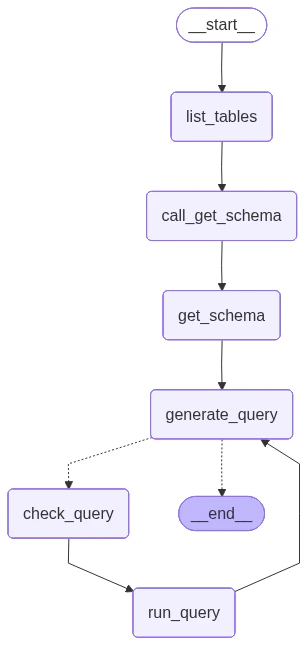
我们现在可以使用Graph API将这些步骤组装成一个工作流程。我们在查询生成步骤定义了一个条件边,如果生成了查询,则会路由到查询检查器,如果没有工具调用,则结束,这样LLM就为查询提供了响应。def should_continue(state: MessagesState) -> Literal[END, "check_query"]:
messages = state["messages"]
last_message = messages[-1]
if not last_message.tool_calls:
return END
else:
return "check_query"
builder = StateGraph(MessagesState)
builder.add_node(list_tables)
builder.add_node(call_get_schema)
builder.add_node(get_schema_node, "get_schema")
builder.add_node(generate_query)
builder.add_node(check_query)
builder.add_node(run_query_node, "run_query")
builder.add_edge(START, "list_tables")
builder.add_edge("list_tables", "call_get_schema")
builder.add_edge("call_get_schema", "get_schema")
builder.add_edge("get_schema", "generate_query")
builder.add_conditional_edges(
"generate_query",
should_continue,
)
builder.add_edge("check_query", "run_query")
builder.add_edge("run_query", "generate_query")
agent = builder.compile()
from IPython.display import Image, display
from langchain_core.runnables.graph import CurveStyle, MermaidDrawMethod, NodeStyles

display(Image(agent.get_graph().draw_mermaid_png()))
question = "Which genre on average has the longest tracks?"

for step in agent.stream(
    {"messages": [{"role": "user", "content": question}]},
    stream_mode="values",
):
    step["messages"][-1].pretty_print()
================================ Human Message =================================

Which genre on average has the longest tracks?
================================== Ai Message ==================================

Available tables: Album, Artist, Customer, Employee, Genre, Invoice, InvoiceLine, MediaType, Playlist, PlaylistTrack, Track
================================== Ai Message ==================================
Tool Calls:
  sql_db_schema (call_yzje0tj7JK3TEzDx4QnRR3lL)
 Call ID: call_yzje0tj7JK3TEzDx4QnRR3lL
  Args:
    table_names: Genre, Track
================================= Tool Message =================================
Name: sql_db_schema


CREATE TABLE "Genre" (
	"GenreId" INTEGER NOT NULL,
	"Name" NVARCHAR(120),
	PRIMARY KEY ("GenreId")
)

/*
3 rows from Genre table:
GenreId	Name
1	Rock
2	Jazz
3	Metal
*/


CREATE TABLE "Track" (
	"TrackId" INTEGER NOT NULL,
	"Name" NVARCHAR(200) NOT NULL,
	"AlbumId" INTEGER,
	"MediaTypeId" INTEGER NOT NULL,
	"GenreId" INTEGER,
	"Composer" NVARCHAR(220),
	"Milliseconds" INTEGER NOT NULL,
	"Bytes" INTEGER,
	"UnitPrice" NUMERIC(10, 2) NOT NULL,
	PRIMARY KEY ("TrackId"),
	FOREIGN KEY("MediaTypeId") REFERENCES "MediaType" ("MediaTypeId"),
	FOREIGN KEY("GenreId") REFERENCES "Genre" ("GenreId"),
	FOREIGN KEY("AlbumId") REFERENCES "Album" ("AlbumId")
)

/*
3 rows from Track table:
TrackId	Name	AlbumId	MediaTypeId	GenreId	Composer	Milliseconds	Bytes	UnitPrice
1	For Those About To Rock (We Salute You)	1	1	1	Angus Young, Malcolm Young, Brian Johnson	343719	11170334	0.99
2	Balls to the Wall	2	2	1	U. Dirkschneider, W. Hoffmann, H. Frank, P. Baltes, S. Kaufmann, G. Hoffmann	342562	5510424	0.99
3	Fast As a Shark	3	2	1	F. Baltes, S. Kaufman, U. Dirkscneider & W. Hoffman	230619	3990994	0.99
*/
================================== Ai Message ==================================
Tool Calls:
  sql_db_query (call_cb9ApLfZLSq7CWg6jd0im90b)
 Call ID: call_cb9ApLfZLSq7CWg6jd0im90b
  Args:
    query: SELECT Genre.Name, AVG(Track.Milliseconds) AS AvgMilliseconds FROM Track JOIN Genre ON Track.GenreId = Genre.GenreId GROUP BY Genre.GenreId ORDER BY AvgMilliseconds DESC LIMIT 5;
================================== Ai Message ==================================
Tool Calls:
  sql_db_query (call_DMVALfnQ4kJsuF3Yl6jxbeAU)
 Call ID: call_DMVALfnQ4kJsuF3Yl6jxbeAU
  Args:
    query: SELECT Genre.Name, AVG(Track.Milliseconds) AS AvgMilliseconds FROM Track JOIN Genre ON Track.GenreId = Genre.GenreId GROUP BY Genre.GenreId ORDER BY AvgMilliseconds DESC LIMIT 5;
================================= Tool Message =================================
Name: sql_db_query

[('Sci Fi & Fantasy', 2911783.0384615385), ('Science Fiction', 2625549.076923077), ('Drama', 2575283.78125), ('TV Shows', 2145041.0215053763), ('Comedy', 1585263.705882353)]
================================== Ai Message ==================================

The genre with the longest tracks on average is "Sci Fi & Fantasy," with an average track length of approximately 2,911,783 milliseconds. Other genres with relatively long tracks include "Science Fiction," "Drama," "TV Shows," and "Comedy."
请参阅 LangSmith 跟踪 了解上述运行情况。
6. 实施人工审核循环
在执行智能体的SQL查询之前检查其查询,以避免任何未预期的行为或低效,这是一种谨慎的做法。 在这里,我们利用LangGraph的人机协同功能在执行SQL查询之前暂停运行,并等待人工审核。通过LangGraph的持久化层,我们可以无限期(或者至少是持久化层存活期间)暂停运行。 让我们将sql_db_query 工具封装在一个接收人类输入的节点中。我们可以使用 中断 函数来实现这一点。下面,我们允许输入来批准工具调用、编辑其参数或提供用户反馈。
from langchain_core.runnables import RunnableConfig
from langchain.tools import tool
from langgraph.types import interrupt

@tool(
    run_query_tool.name,
    description=run_query_tool.description,
    args_schema=run_query_tool.args_schema
)
def run_query_tool_with_interrupt(config: RunnableConfig, **tool_input):
    request = {
        "action": run_query_tool.name,
        "args": tool_input,
        "description": "Please review the tool call"
    }
    response = interrupt([request])
    # approve the tool call
    if response["type"] == "accept":
        tool_response = run_query_tool.invoke(tool_input, config)
    # update tool call args
    elif response["type"] == "edit":
        tool_input = response["args"]["args"]
        tool_response = run_query_tool.invoke(tool_input, config)
    # respond to the LLM with user feedback
    elif response["type"] == "response":
        user_feedback = response["args"]
        tool_response = user_feedback
    else:
        raise ValueError(f"Unsupported interrupt response type: {response['type']}")

    return tool_response
from langgraph.checkpoint.memory import InMemorySaver

def should_continue(state: MessagesState) -> Literal[END, "run_query"]:
    messages = state["messages"]
    last_message = messages[-1]
    if not last_message.tool_calls:
        return END
    else:
        return "run_query"

builder = StateGraph(MessagesState)
builder.add_node(list_tables)
builder.add_node(call_get_schema)
builder.add_node(get_schema_node, "get_schema")
builder.add_node(generate_query)
builder.add_node(run_query_node, "run_query")

builder.add_edge(START, "list_tables")
builder.add_edge("list_tables", "call_get_schema")
builder.add_edge("call_get_schema", "get_schema")
builder.add_edge("get_schema", "generate_query")
builder.add_conditional_edges(
    "generate_query",
    should_continue,
)
builder.add_edge("run_query", "generate_query")

checkpointer = InMemorySaver()
agent = builder.compile(checkpointer=checkpointer)
import json

config = {"configurable": {"thread_id": "1"}}

question = "Which genre on average has the longest tracks?"

for step in agent.stream(
    {"messages": [{"role": "user", "content": question}]},
    config,
    stream_mode="values",
):
    if "messages" in step:
        step["messages"][-1].pretty_print()
    elif "__interrupt__" in step:
        action = step["__interrupt__"][0]
        print("INTERRUPTED:")
        for request in action.value:
            print(json.dumps(request, indent=2))
    else:
        pass
...

INTERRUPTED:
{
  "action": "sql_db_query",
  "args": {
    "query": "SELECT Genre.Name, AVG(Track.Milliseconds) AS AvgLength FROM Track JOIN Genre ON Track.GenreId = Genre.GenreId GROUP BY Genre.Name ORDER BY AvgLength DESC LIMIT 5;"
  },
  "description": "Please review the tool call"
}
from langgraph.types import Command


for step in agent.stream(
    Command(resume={"type": "accept"}),
    # Command(resume={"type": "edit", "args": {"query": "..."}}),
    config,
    stream_mode="values",
):
    if "messages" in step:
        step["messages"][-1].pretty_print()
    elif "__interrupt__" in step:
        action = step["__interrupt__"][0]
        print("INTERRUPTED:")
        for request in action.value:
            print(json.dumps(request, indent=2))
    else:
        pass
================================== Ai Message ==================================
Tool Calls:
  sql_db_query (call_t4yXkD6shwdTPuelXEmY3sAY)
 Call ID: call_t4yXkD6shwdTPuelXEmY3sAY
  Args:
    query: SELECT Genre.Name, AVG(Track.Milliseconds) AS AvgLength FROM Track JOIN Genre ON Track.GenreId = Genre.GenreId GROUP BY Genre.Name ORDER BY AvgLength DESC LIMIT 5;
================================= Tool Message =================================
Name: sql_db_query

[('Sci Fi & Fantasy', 2911783.0384615385), ('Science Fiction', 2625549.076923077), ('Drama', 2575283.78125), ('TV Shows', 2145041.0215053763), ('Comedy', 1585263.705882353)]
================================== Ai Message ==================================

The genre with the longest average track length is "Sci Fi & Fantasy" with an average length of about 2,911,783 milliseconds. Other genres with long average track lengths include "Science Fiction," "Drama," "TV Shows," and "Comedy."